Old Facebook finally wants you to ‘Meet New Friends’

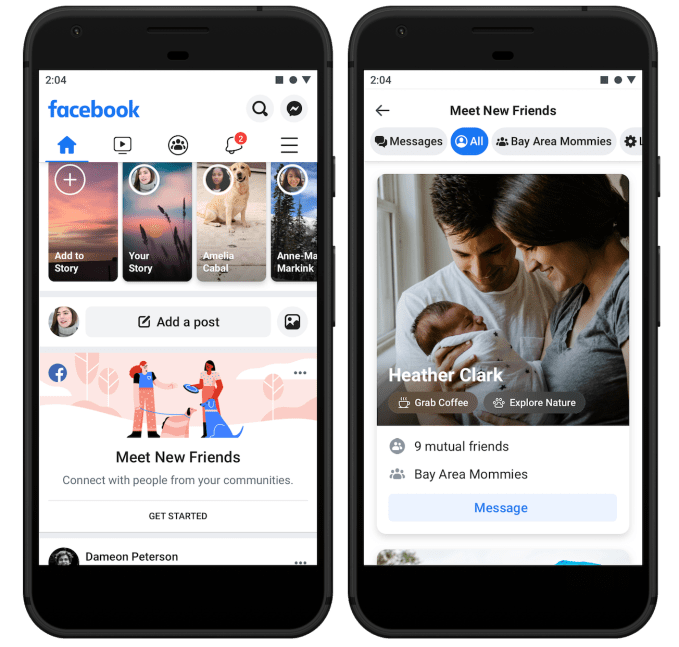
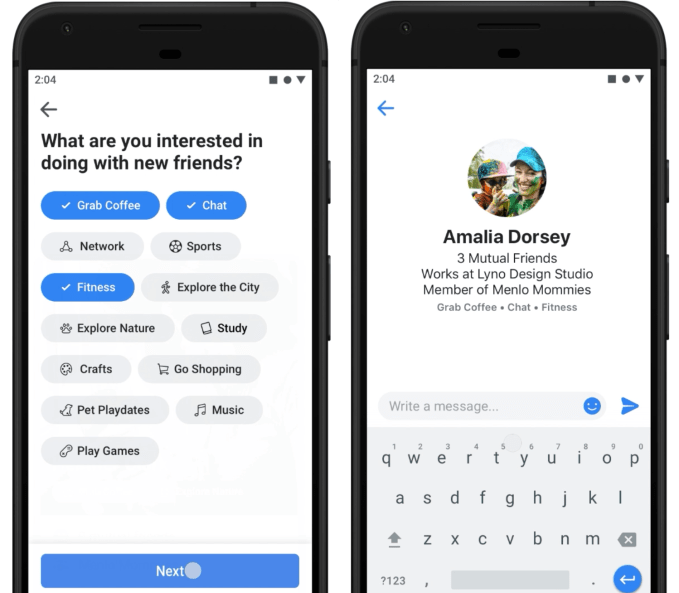
Facebook’s social graph is aging, full of long-lost acquaintances and hometown friends you don’t care much about seeing in the News Feed any more. But Facebook is now testing a pivot away from its core identity of connecting you with existing friends so it can revitalize the social graph and keep people coming back. Facebook’s “Meet New Friends” lets you browse people from shared communities such as your school, workplace or city who’ve also opted in to the feature. It’s now in testing in a few markets before it’s rolled out more widely soon.

Meet New Friends could give people fresh pals to follow in their News Feed, or help recently registered users grow their network until they have access to enough content to keep them busy. And eventually, Facebook could layer on monetization features similar to dating apps where users pay to be shown more prominently to potential connections.
Fidji Simo, the head of Facebook’s main app, tells me Meet New Friends was based on emerging behaviors the company had spotted. “Developing relationships with people they didn’t already know is very different from the core use case of Facebook,” but she notes, “We’ve already seen that naturally happen in Groups, and Meet New Friends will make that a bit easier.”

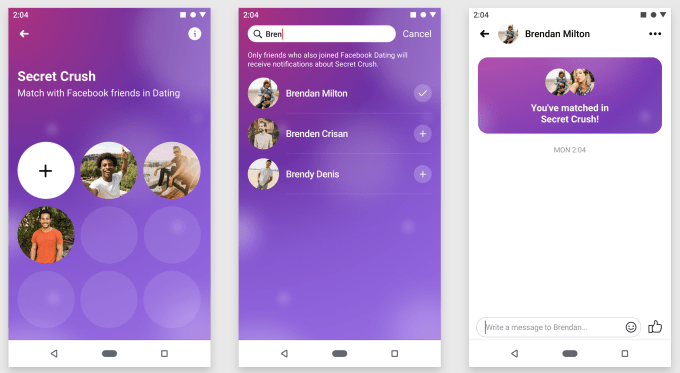
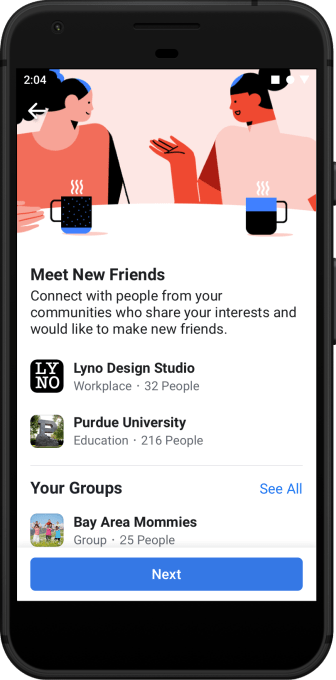
When users open Meet New Friends, they pick the communities through which they’re open to meeting new friends. For now they choose between schools, employers and locations, but Facebook will eventually add Groups too. In that sense it works a bit like Facebook Dating, which rolls out to 14 new countries today and opens to dating friends with its new Secret Crush feature.

Algorithms will sort potential connections by who is most relevant, such as those with mutual friends or shared interests, but you won’t get “matched” where both users have to state their interest in the other. Instead, users can just browse profiles, and then either send people a friend request (which might feel a bit out of the blue), or send them a single text-only message to a recipient’s dedicated Meet New Friends chat inbox. They can’t message that same person again until they respond (to prevent spamming), and the text-only limitation ensures no unsavory photos get blasted around. If they do reply, the thread moves to Facebook Messenger.

Meet New Friends will pit Facebook against a range of other apps, from local-focused Meetup and Nextdoor to verticalized apps like Hey Vina for women only to dating-affiliated apps like Bumble BFF. But Facebook benefits from its ubiquity, so users can try Meet New Friends without feeling embarrassed by downloading an app just to make them less lonely.
For years, the mildly creepy People You May Know feature has been a cornerstone of Facebook’s growth strategy. But it’s still just about recreating your offline social graph online. As Facebook strives to become more meaningful to people’s lives, fostering new friendships could give people a fuzzy feeling about the giant corporation.

Microsoft’s Mixer now lets streamers reward fans for participation, not just subscriptions

On game streaming platforms today, there’s really only one way to earn status within a creator’s community: you have to become a subscriber. Microsoft’s game streaming service Mixer is today aiming to offering a third path to status through loyalty and participation. In doing so, it hopes to better differentiate itself from larger rivals like Twitch and YouTube.

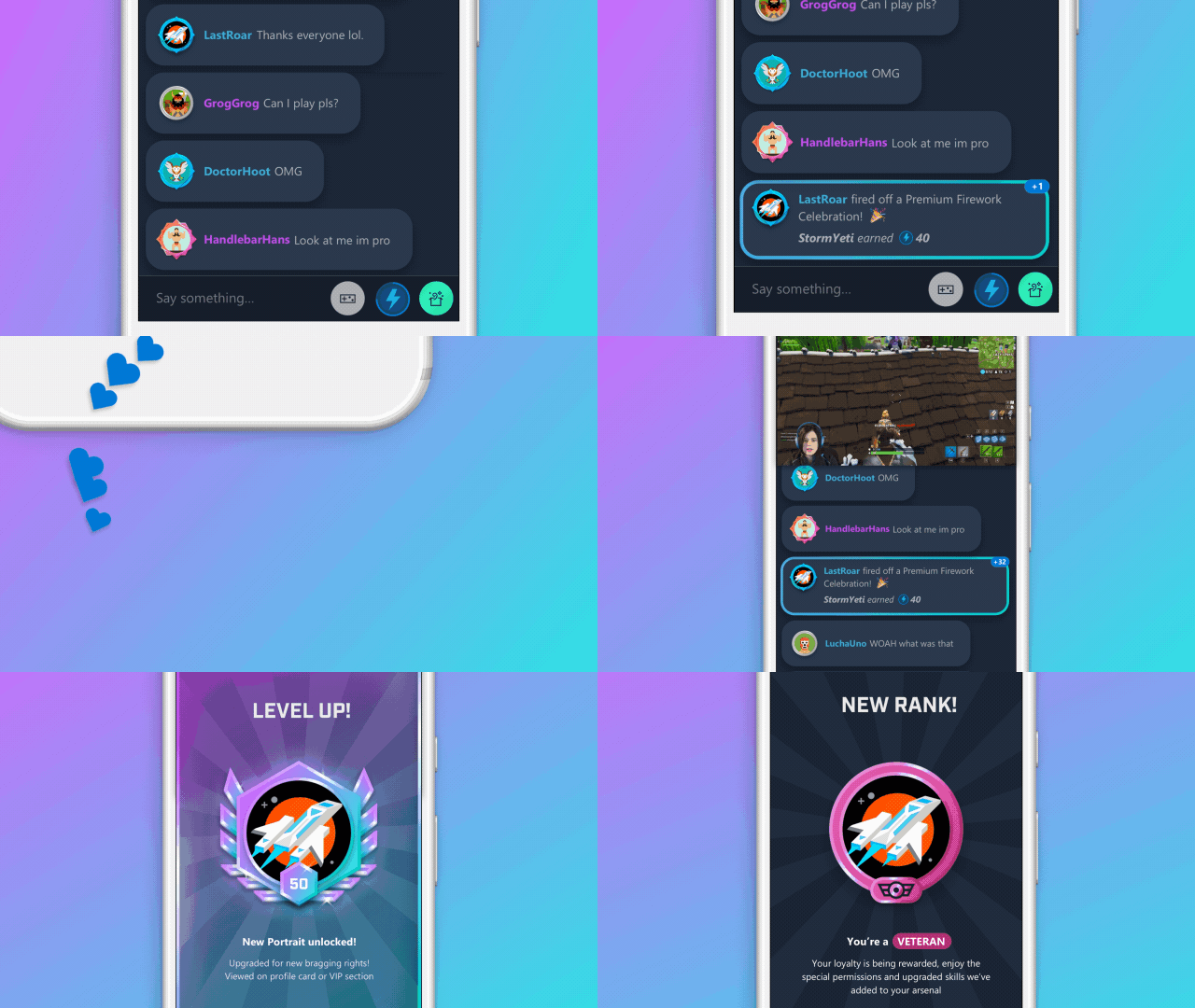
Channel Progression, as this new feature is called, is a system that rewards community members and a streamer’s fans for more than just their financial contributions. It also takes into account other activity within the channel and on Mixer as a whole.

Members can level up by participating in the stream’s chat, by their repeat visits, by using Skills (aka other forms of expression like stickers, effects and GIFs that are used in chats), and more. That means that viewers will be able to earn rewards and raise their rank by just participating — watching, chatting, following, subscribing, and later, through other actions, as well.

As streamers participate, they’ll rank up, gaining them bragging rights and other perks that will vary by their rank level. They can also check on their rank at any time by clicking on the “Your Rank” button at the bottom left corner of the chat box.

The feature is rolling out on Wednesday May 1, 2019 to all streamers on Mixer — not just Mixer Partner, as it’s designed to not only be a way for streamers to grow their own communities, but for Mixer itself to grow.

In the future, however, Mixer Partners will be able to also reward monetization actions, like subscribing, gift subscriptions, and for spending Embers (virtual currency).

The changes come at a time when there’s been a rise in complaints over how hard it is to get noticed on the leading game streaming site, Twitch. Some smaller streamers told The Verge last summer they spent years broadcasting to no one, and found it difficult to grow their community, despite the effort Twitch has made in this area. More recently, that’s included the launch of a four-person Squad Stream, to help creators get discovered.

Despite this, Twitch’s longtail continues to grow — according to a recent report from StreamElements, the top 1,000 Twitch channels were responsible for 57% of Twitch’s viewership hours in Q1 2019, and the longtail (those beyond the top 10,000 channels) was responsible for 20%. In total, Twitch hit 2.7 billion hours of content watched in Q1, the report claimed.

Mixer, by comparison, is much smaller. Its numbers may have quadrupled since Q1 2019, but that’s only going from 22 million hours watched to 89 million. It still has much, much further to go to catch up with YouTube Live, not to mention Twitch.

Mixer’s channel progression feature was originally announced in November as part of Mixer’s “Season 2” release. It launches tomorrow to all on Mixer.com on the desktop and will roll out to all other platforms in the weeks ahead.

Facebook Dating opens to friends with Secret Crush

Facebook built Dating to be privacy-safe, hoping to avoid the awkwardness of friends or family checking out your romance profile. But now Facebook has found a way to let you silently express your affection for a friend without them knowing unless they reciprocate.

Facebook Dating is opening in 14 more countries, bringing the total to 19. It will launch in the US before the end of the year. Dating brings with it a new feature called Secret Crush that expands it beyond strangers and friends-of-friends. Choose up to 9 friends you like-like. If they’ve opted into Facebook Dating, they’ll get a notification that some friend has a crush on them. If they add you as a Secret Crush too, you’re both notified and can chat on Messenger.

Facebook Dating product manager Charmaine Hung tells me that “I have 2000 Facebook friends. I’m not best friends with all 2000 people, and there’s a good chance that one of that could be a really good match with me. I trust them, I appreciate them, and I know we’re compatible. The only thing missing is knowing if we’re both interested in being more than just friends without the fear of rejection if you were to do this in real life.”

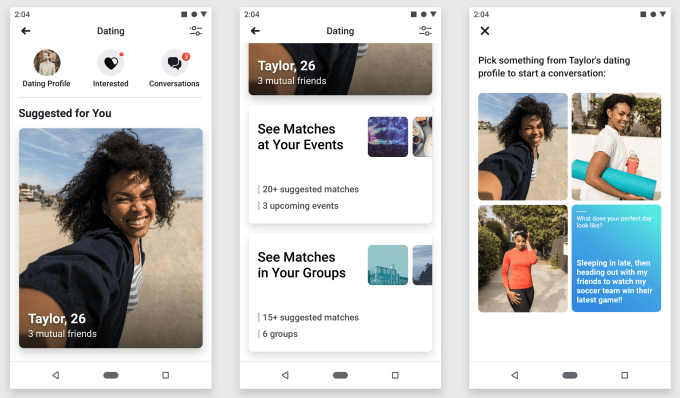
Facebook announced Dating at F8 a year ago and launched it in Colombia in September. Users opt-in, and then browse Events and Groups they’re part of for potential matches. They send them a text-only message based on something in their profile which goes to a special Dating inbox. And if that person reciprocates, they can chat and maybe meet up. Now it’s opening in the Philippines, Vietnam, Singapore, Malaysia, Laos, Brazil, Peru, Chile, Bolivia, Ecuador, Paraguay, Uruguay, Guyana, and Suriname.

One concern with Secret Crush is that users might spam the feature by constantly adding a removing people from their list until they discover a match. That’s why Facebook will only let you sub out one person per day after you reach your initial limit of 9.

Currently there’s still no plan to monetize Dating, but that’s not the point. After years of scandals, Facebook needs to prove it deserves to be your social network. Mindlessly browsing the News Feed has proven to be exhausting and at times detrimental to health. But if the app can introduce you to your future spouse, or even just a summer fling, you might keep a place in your for Facebook too.

Instagram officially tests hiding Like counts

Would we feel less envious, shameful and competitive if Instagram didn’t tell us how many Likes a post received? That’s the idea behind Instagram now hiding Like counts from both a post’s viewers and its author as part of an experiment in Canada. A post’s creator can still open the Likers window to see the names of everyone who hearted their post, but they’d have to count them manually.

Even though Like totals would still impact how the algorithm ranks a post in the feed, if rolled out, the change would refocus Instagram on self-expression instead of being a popularity contest. Users might be less likely to delete a photo or video because it didn’t get enough Likes, or resort to their Finsta account to post something authentic but less “perfect.” It could make us less likely to envy-spiral because we wouldn’t see friends or influencers getting more Likes than us. And people might be more willing to post what truly represents their complicated identities because they’re not battling for the biggest Like count.

“Later this week, we’re running a test in Canada that removes the total number of likes on photos and video views in Feed, Permalink pages and Profile,” an Instagram spokesperson tells TechCrunch. “We are testing this because we want your followers to focus on the photos and videos you share, not how many likes they get.” The small percentage of Canadian users in the test will see a notice atop their feed warning them of  “a change to how you see Likes.”

One big concern, though, is that influencers often get discovered for paid promotions or have their sponsored content measured by public Like counts or a screenshot of their Liker list. “We understand that this is important for many creators, and while this test is in exploratory stages, we are thinking through ways for them to communicate value to their brand partners,” an Instagram spokesperson tells TechCrunch.

TechCrunch first reported two weeks ago that Instagram had prototyped hiding public Like counts, as spotted by Jane Manchun Wong. The company confirmed the feature had been built but not tested in the wild. The news immediately set off a wave of commentary from users. Many, while initially shocked, thought it would make Instagram usage healthier and cutback on some of the toxic anxiety produced by staring at the little numbers.

So why test in Canada? “Canadians are highly social and tech savvy, with over 24 million people connecting across our family of apps each month. We wanted to test this with a digitally savvy audience that has a thriving community on Instagram,” a company spokesperson told us.

It’s reassuring to see Instagram adding new well-being features after the departure of founders Kevin Systrom and Mike Krieger. Systrom in particular had been a big proponent of reducing envy and inauthenticity on social media, which was part of the impetus for launching Instagram Stories, where users could share unpolished looks at their lives. Before he left in September, Instagram rolled out its Your Activity dashboard showing the average time you spent per day on the app, plus a “You’re All Caught Up” warning that tells users they’ve seen all recent feed posts and can stop scrolling.

A 2013 study by Krasnova et al. discovered that 20 percent of envy-causing situations that experiment participants experienced happened on Facebook. They also determined that Facebook causes toxic envy, noting that “intensity of passive following is likely to reduce users’ life satisfaction in the long-run, as it triggers upward social comparison and invidious emotions.” Instagram, with its focus on imagery and manicured looks at our lives, might cause even more envy. Hiding Likes would be a strong step toward us judging ourselves less.

Workplace, Facebook’s enterprise edition, gets a reboot to boost activity and cut down on noise

At F-8 today, Facebook is unveiling a major redesign for its desktop app — the first big update it’s made since 2014 — and a refresh of its mobile apps as it begins to bring its many functions, features and apps under a more unified umbrella. And along with that, Workplace, its enterprise version, is also getting a renovation. Aimed at increasing access to different features like Groups, Chats and Notifications, the update brings their functionality closer together, and on top of that introduces more of Facebooks’s famous algorithm, to suggest people and groups tailored to you.

“We’ve redesigned the experiences so that the code bases remain the same,” Karandeep Anand, the head of Workplace, said of the new updates and how they relate to Facebook.

Workplace announced in February that it now has 2 million paying users, along with “millions” more using the free or Workplace for Good versions, and now the name of the game for the company is engagement.

Getting more people to use Workplace more regularly as part of their daily work life increases the likelihood that companies will continue using (and paying for) it — and crucially not jumping to a competitor. As Slack approaches its IPO and prepares itself for more public scrutiny, and Microsoft continues to double down on new features, that strategy is perhaps more important than ever.

To that end, the company today showed off a new desktop version of Workplace that gives it parity with the mobile app and Facebook’s updated consumer desktop experience.

We’re running a series of screenshots here of how the new pages on desktop look, and the second set of images are screenshots of the “old” Workplace, so that you can see how it was cleaned up.

And here are some shots of the older version:

On the UI side, the new design notably brings two key Workplace features — Groups and contacts for Chats — out of the right-rail graveyard, where many users are believed to have stopped looking years ago to ignore ads — and into the left column, which used to provide a menu of tools and further information about your organization. The idea is that, by putting them on the left, it will make it more likely for people to turn to these lists and engage with them more.

“We’re making usage significantly more tighter and coupled between posts and Groups,” said Anand. “The idea is to bring messaging into the same room as wider conversations.”

Notifications, meanwhile, is getting its own “inbox”, so to speak. This is a clever turn that essentially expands the list of actions that have happened that are relevant to you, so that you can click on each one and jump to a view of that relevant piece of content, separate from being in the main default page. This is a useful way for people who might be very busy to look quickly through a series of different updates without the distraction of looking at the rest of their Workplace feed.

Distraction is a theme here: another new update is that Workplace now has a “focus” mode in sections like Groups that take away the left navigation column so that you can look specifically at the content you are working on without lots of alerts from other groups, individuals or the company at large. Given the immense amount of distraction that we have these days from notifications, this could be a welcome change for some.

On top of the UI changes, Facebook is giving Workplace a bigger international twist as well. The app is now available in 46 languages, and now Facebook will be offering more auto-translation options to its users to leverage that.

There is also another level of changes taking place that are more under the hood but also interesting: Facebook is introducing more algorithmic features into Workplace, by tapping into your “work graph” to suggest people and groups that you might interact with.

Up to now, there was already some algorithmic tweaking to Workplace: admins could bump certain news items into people’s feeds so that they were seen by more employees; and similarly the newsfeed didn’t run in a chronological order but based on what you interacted with, which groups you were already a part of, and so on, to bring you content that was deemed more relevant.

Now that is being expanded to connections and groups. The aim here is pretty clear: by giving you a more tailored list of people and content, Workplace will hopefully keep your attention for longer. Anand says that it’s important for Facebook and Workplace to continue to keep parity in their codebases, but it’s moves like this one that underscore how Facebook aims to keep the ethos of the two products aligned as well.

Review: Oculus Quest could be the Nintendo Switch of VR

Facebook has bet a lot on its VR dream. The industry has become the butt of a few jokes in the past couple years as hype has deflated, but there’s been no question that the tech is interesting, the question has been whether it’s sustainably cool. Oculus made a gamble on the high-end three years ago, but the $399 standalone Quest is where they see whether that bet was worth it.

In a lot of ways, this is a VR headset built in the spirit of the Nintendo Switch.* Performance is secondary to the depth of user experience and ease of use. It’s vastly easier to get this out of the box and start playing with tracked VR than any other VR headset I’ve used. It takes minutes the first time you take it out of the box and seconds in subsequent uses.

You don’t need a PC, you don’t need to connect a cable to anything, you don’t need to stress. The Quest nails experience.

Things I like:

  • Great overall experience, picking the headset up and getting into VR takes a minute.
  • ^ That.
  • ^^ That again.
  • Great library of launch titles.
  • Battery life is better than expected.

Things I don’t like:

  • OLED screen suffers same pixelated look as original Rift, LCD displays in Rift S and Go appear crisper, especially for things like text legibility.
  • Near-ear speakers are generally poor quality; you’ll probably want headphones.
  • Total tracking volume for controllers could be better.

How does it feel?

The Insight tracking system does well for the most part, it’s the only choice for a standalone headset so there’s no point comparing it to the fidelity of outside-in tracking systems. It performs well and the headset-tracking was was generally flawless, the controller-tracking was a bit more mixed as the cameras frequently lost sight of the controllers during gameplay.

There are some cool little things that this tracking system integrates, like shifting to a passthrough camera when you walk outside of your Guardian safe space so you have a sense of where you’re at.

When it comes to hardware, the headset makes compromises i

The performance of the mobile chipset certainly doesn’t offer a PC experience but the user experience has been fine-tuned so well that you forgive its shortcomings. Oculus certainly seems to get the most of the Snapdragon 835, which powers the headset, but Rift users will realize within 10 seconds that this is a lower class of device even if some of the titles are the same. That’s not to say that the experiences look bad, but expectations that Oculus eeked desktop performance out of the chipset that powered the Galaxy S8 should be heavily tempered.

There are over 50 titles in the Quest store at launch. I got access to a handful including favorites like Beat Saber and Superhot VR. Oculus has a great line-up. The games may offer less fidelity in detail but they feel full-featured all the same.

The display and optics are adequate though things aren’t as crisp as one might hope, the pixel layout falls victim to the “screen-door effect” where you can basically see the space between pixels quite clearly. This isn’t the case with even the budget Oculus Go.

The battery life is better than I was expecting. Oculus says you can expect about 2 hours of heavy-gaming and 3 hours of media watching, this seems to be a conservative estimate based on my experience. This is still a machine that you leave plugged-in at all times in-between uses, using it while tethered to an external battery pack isn’t the worst though.

The headset may not be the most powerful, but it is doubtlessly the new flagship VR product from Facebook. The company outsourced design of its PC-powered Rift S headset to Lenovo because the high-end isn’t where Oculus needs to find new customers, the Quest is a bet on going mainstream and from my experience, it seems to be a worthwhile bet.


* Now, before you sound off in the comments. Yes, Nintendo has created a cardboard Labo VR holder for the Nintendo Switch, but the Nintendo Switch is just a Switch, it’s not the Switch of VR. 

US border agents assert ‘broad unconstitutional’ power to search citizens’ devices

U.S. border officials are asserting “broad, unconstitutional authority” to conduct warrantless searches of travelers’ phones, tablets and laptops, according to a new court filing.

The findings, obtained from depositions and discovery filed in court by the American Civil Liberties Union on Tuesday, claim U.S. Customs and Border Protection (CBP) and Immigration and Customs Enforcement (ICE) are overreaching their powers to search traveler devices at the border without seeking a court-approved warrant.

Esha Bhandari, staff attorney with the ACLU’s Speech, Privacy, and Technology Project, said the agencies were “using the pretext of the border to make an end run around” the constitution.

“The border is not a lawless place, ICE and CBP are not exempt from the constitution, and the information on our electronic devices is not devoid of Fourth Amendment protections,” said Bhandari, citing the protection of free speech and warrantless searches.

“We’re asking the court to stop these unlawful searches and require the government to get a warrant,” she said.

The filing is the latest from a lawsuit filed by the ACLU alongside the Electronic Frontier Foundation by ten U.S. citizens and one permanent resident — including a NASA engineer and a journalist — whose devices were searched at the border without a warrant. In some cases, their devices were confiscated for months.

“The border is not a lawless place, ICE and CBP are not exempt from the constitution.”
Esha Bhandari, ACLU

The plaintiffs are asking the court to rule that the government must first have a warrant to search their devices, based off reasonable suspicion that a crime may have been committed.

The ACLU wants the court to rule without trial.

Border searches are on the rise. CBP searched more than 30,000 travelers’ devices last year, close to four-times the number from three years prior. But Homeland Security, which houses both CBP and ICE, has long claimed authority to search anyone arriving at the U.S. under the border search exception, a doctrine said to stretch 100 miles inland, encompassing dozens of America’s largest cities. Several appeals courts have sparred over the constitutionality of the exception — with the decision likely to end up at the Supreme Court.

According to its latest filing, the ACLU said border officials are searching devices without a warrant for a broad range of reasons, including enforcing tax, bankruptcy, environmental, and consumer protection laws.

The ACLU also said that ICE agents have searched the devices of a U.S. citizen if they are seeking information about a suspected undocumented person, and also claim the right to search the devices of journalists who are “known to have had contact with a suspected terrorist, where there is no suspicion that the reporter engaged in wrongdoing,” and any “foreign sources who are of interest to the U.S. government.”

The group also said devices are being searched for either intelligence gathering or advancing pre-existing investigations, and CBP staff will also consider requests from other law enforcement agencies — including foreign agencies — when carrying out searches.

Any data collected by CBP or ICE without a warrant can be shared with federal, state, local and foreign law enforcement, the ACLU said.

The filing also said CBP officers “may have accessed cloud-based content during searches of electronic devices,” despite a directive in April 2017 barring officers from accessing cloud-based data from a device.

Adam Schwartz, a senior staff attorney at the Electronic Frontier Foundation, said the government’s warrantless searches are “unconstitutionally broad.”

“ICE and CBP policies and practices allow unfettered, warrantless searches of travelers’ digital devices, and empower officers to dodge the Fourth Amendment when rifling through highly personal information contained on laptops and phones,” he said.

When reached, spokespeople for CBP and ICE did not immediately comment.

Review: Facebook’s Oculus Rift S is barely an upgrade

More than three years after Facebook released one of the biggest gambles in its existence, a virtual reality headset it paid billions to launch as its own, the company has grown more embattled but its moonshot VR flagship has grown safer.

Facebook’s sequel to the Oculus Rift is not the Rift 2, it is the Rift S. Just as the iPhone naming scheme denotes the tock to a tick rather than a full revolution; the latest product is a hardware update, albeit a pretty minor one, more of a 1.2 than a 2.0.

It wasn’t always going to be this way — the company’s founding CEO had other plans. But the Rift S represented a way for Facebook to push the accessibility of its most high-end headset and likely the profit margins of the cheaper-feeling headset, which does cost $399 versus the original Rift’s $349 price tag, a number that danced and dwindled its way down from a Rift + Touch launch price of $798 at the end of 2016.

The hardware design isn’t really the story that Facebook and Oculus are pushing with the Rift S. The hardware is a product of sacrifices that give the entire headset a lower-end feeling than the Quest or Go, it was largely built by Lenovo after all; as such this release is mostly about the software advancements.

The built-in “Insight” tracking is the highlight and lowlight of the release. It’s undoubtably a downgrade from the full capabilities of its predecessor — while the headset tracks itself very well, I would frequently lose tracking on the controllers on the cameras’ peripheral– but it also makes the system considerably easier to set up and maintain. Gone are the external sensors and their damn driver updates, gone are the constant needs for recalibration when a headset was bumped out of place — this is a headset that learns from your space.

The external sensor system on the original Rift required three spaced out sensors in order to fully capture the total range of body motion. The headset only came with two sensors which minimized these capabilities and forced game developers to build titles that would constantly lead users to reorient themselves towards the sensors. No such reorienting is needed with the Rift S which brings the tracking cameras into the headset itself.

Features like the updated “Guardian” boundary setup and the passthrough camera that activates once you leave the safe space showcase some of the key learnings of the past few years and some of the added benefits of the onboard tracking. All of this feels very natural and mature.

While the headset’s onboard tracking feels great, the experience for controller tracking is more hit-or-miss. Common in-game motions like examining an object and turning the top of the controller away from you can lead to briefly obscuring the tracking rings and thus temporarily losing tracking. It always seems to recover, but there are moments in games where you are being chased and need to shoot behind you or grab something offscreen while maintaining focus on an object. These are moments where you see some short-sightedness in Oculus’s choice.

My first impressions of the Rift S were less than stellar, but after getting it in my home for some lengthy VR sessions, I’ve warmed up to it a little bit. It still doesn’t feel like a proper upgrade to a flagship headset that’s already three years old, but it is a more fine-tuned system that feels more evolved and dependable. There are still certainly some things I don’t like…

Things that are subpar:

  • The controller tracking system isn’t robust enough for the demands of VR movements, you will notice and frequently feel the outside edge of the tracking boundary in intense gaming sessions.
  • The lack of adjustable displays to account for the differing distances between people’s eyes means that the one-size-fits-all headset gives a less optimal experience for certain users. I am one of those users that falls just outside of that sweet spot, something that made the headset a bit less comfortable on the eyes than its predecessor for me.
  • The original Touch controllers were better and more ergonomic, with the headset blinding me I put these controllers in the wrong hand roughly 50% of the time.
  • The lack of built-in headphones was an annoying choice, the near-ear speakers are better than expected but don’t isolate you from the world, a concept that the entire headset is sort of built around.
  • The face padding is far less comfortable or durable than the Oculus Go or Oculus Quest, something that feels a bit odd for the top-of-the-line experience.

Things that aren’t as subpar as I had feared:

  • The switch from OLED to LCD panels feels like a downgrade on paper, but the way the sub-pixels are laid out on the higher resolution Rift S display gives a much more crisp image even if the LCD screen’s blacks feel a bit grayer. Running at 80hz versus 90hz isn’t a great choice.
  • I like the flexible head straps of the rest of Oculus’s product line, but the halo design that Lenovo lifted from Sony feels quite comfortable here and given that it’s a PC-tethered system there aren’t unfortunate portability trade-offs like there were with the Mirage Solo headset.
  • I still prefer the build on the previous generation Rift, but the headset feels less clanky than I detailed in my hands-on.

It’s a headset that will offer more pleasant on-boarding and usage to new customers, but for what is supposed to be the industry’s leading high-end headset, Oculus has taken a small step back in performance.

For new customer that are looking for something more high-end than the Quest, the device still offers a lot of advantages. You’ll have some time to make a choice, pre-orders are live for the headset today, but it doesn’t ship until May 21.

Oculus Quest and Rift S ship May 21, pre-orders go live today

Facebook’s new VR headsets, the Oculus Rift S and Quest, are both now live for pre-orders today at $399 and will ship May 21.

Oculus released the original Rift just over three years ago. Fast forward to the present and the Facebook VR product line has gotten more robust. The $199 Oculus Go offers a cheap arena to watch media content, Rift S offers a PC experience that can showcase complex gaming experiences while the Quest aims to be a good fit for novices looking for a portable VR experience.

Facebook hopes the Quest will bring in a new class of users into VR while the Rift S allows it to expand its concurrent reach on PC.

You can read reviews of both systems below:

Facebook Messenger will get desktop apps, co-watching, emoji status

To win chat, Facebook Messenger must be as accessible as SMS, yet more entertaining than Snapchat. Today, Messenger pushes on both fronts with a series of announcements at Facebook’s F8 conference, including that it will launch Mac and PC desktop apps, a faster and smaller mobile app, simultaneous video co-watching and a revamped Friends tab, where friends can use an emoji to tell you what they’re up to or down for.

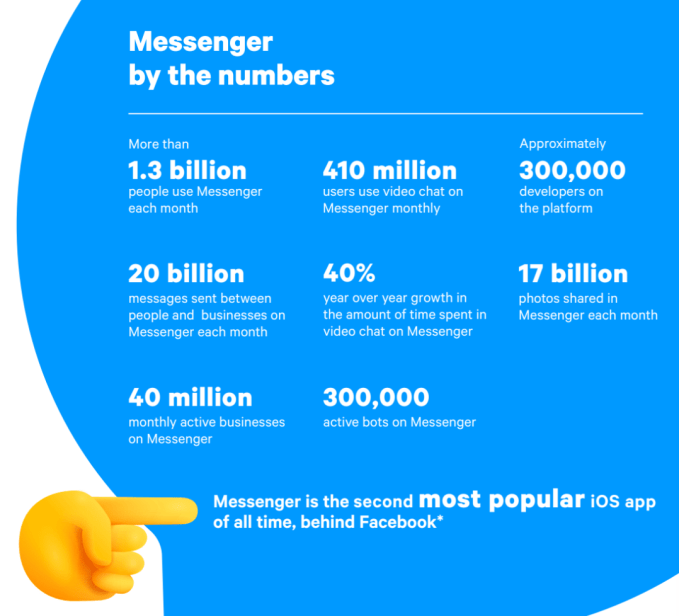
Facebook is also beefing up its tools for the 40 million active businesses and 300,000 businesses on Messenger, up from 200,000 businesses a year ago. Merchants will be able to let users book appointments at salons and masseuses, collect information with new lead generation chatbot templates and provide customer service to verified customers through authenticated m.me links. Facebook hopes this will boost the app beyond the 20 billion messages sent between people and businesses each month, which is up 10X from December 2017.

“We believe you can build practically any utility on top of messaging,” says Facebook’s head of Messenger Stan Chudnovsky. But he stresses that “All of the engineering behind it is has been redone” to make it more reliable, and to comply with CEO Mark Zuckerberg’s directive to unite the backends of Messenger, WhatsApp and Instagram Direct. “Of course, if we didn’t have to do all that, we’d be able to invest more in utilities. But we feel that utilities will be less functional if we don’t do that work. They need to go hand-in-hand together. Utilities will be more powerful, more functional and more desired if built on top of a system that’s interoperable and end-to-end encrypted.”

Here’s a look at the major Messenger announcements and why they’re important:

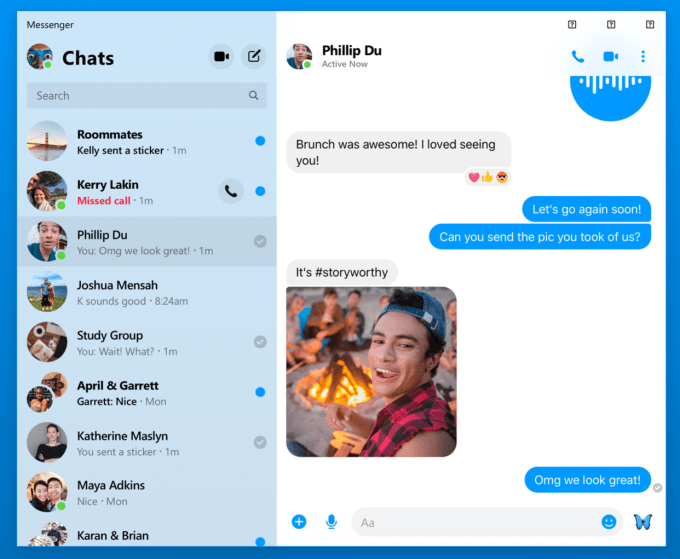
Messenger Desktop – A stripped-down version of Messenger focused on chat, audio and video calls will debut later this year. Chudnovsky says it will remove the need to juggle and resize browser tabs by giving you an always-accessible version of Messenger that can replace some of the unofficial knock-offs. Especially as Messenger focuses more on businesses, giving them a dedicated desktop interface could convince them to invest more in lead generation and customer service through Messenger.

Facebook Messenger’s upcoming desktop app

Project Lightspeed – Messenger is reengineering its app to cut 70 mb off its download size so people with low-storage phones don’t have to delete as many photos to install it. In testing, the app can cold start in merely 1.3 seconds, which Chudnovsky says is just 25 percent of where Messenger and many other apps are today. While Facebook already offers Messenger Light for the developing world, making the main app faster for everyone else could help Messenger swoop in and steal users from the status quo of SMS. The Lightspeed update will roll out later this year.

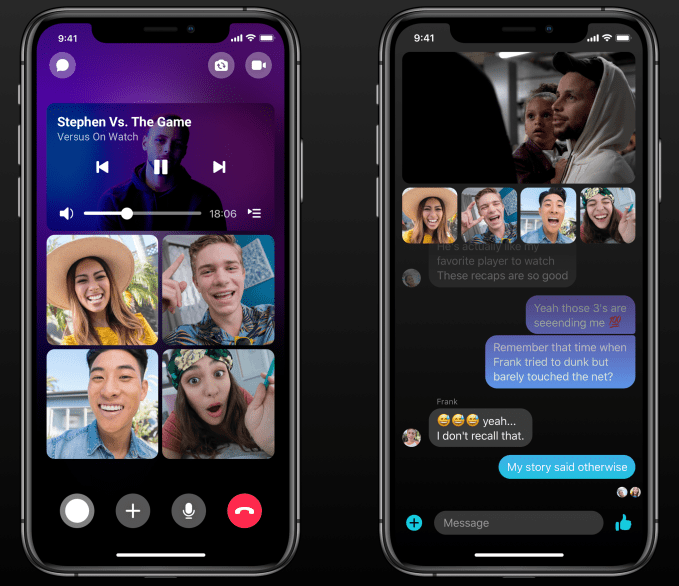
Video Co-Watching – TechCrunch reported in November that Messenger was building a Facebook Watch Party-style experience that would let users pick videos to watch at the same time as a friend, with reaction cams of their faces shown below the video. Now in testing before rolling out later this year, users can pick any Facebook video, invite one or multiple friends and laugh together. Unique capabilities like this could make Messenger more entertaining between utilitarian chat threads and appeal to a younger audience Facebook is at risk of losing.

Watch Videos Together on Messenger

Business Tools – After a rough start to its chatbot program a few years ago, where bots couldn’t figure out users’ open-ended responses, Chudnovsky says the platform is now picking up steam with 300,000 developers on board. One option that’s worked especially well is lead-generation templates, which teach bots to ask people standardized questions to collect contact info or business intent, so Messenger is adding more of those templates with completion reminders and seamless hand-off to a live agent.

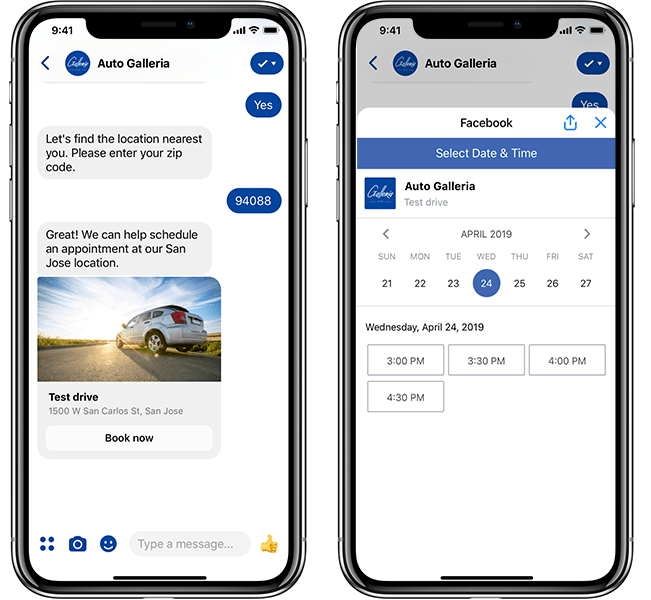
To let users interact with appointment-based businesses through a platform they’re already familiar with, Messenger launched a beta program for barbers, dentists and more that will soon open to let any business handle appointment booking through the app. And with new authenticated m.me links, a business can take a logged-in user on their website and pass them to Messenger while still knowing their order history and other info. Getting more businesses hooked on Messenger customer service could be very lucrative down the line.

Appointment booking on Messenger

Close Friends and Emoji Status – Perhaps the most interesting update to Messenger, though, is its upcoming effort to help you make offline plans. Messenger is in the early stages of rebuilding its Friends tab into “Close Friends,” which will host big previews of friends’ Stories, photos shared in your chats, and let people overlay an emoji on their profile pic to show friends what they’re doing. We first reported this “Your Emoji” status update feature was being built a year ago, but it quietly cropped up in the video for Messenger Close Friends. This iteration lets you add an emoji like a home, barbell, low battery or beer mug, plus a short text description, to let friends know you’re back from work, at the gym, might not respond or are interested in getting a drink. These will show up atop the Close Friends tab as well as on location-sharing maps and more once this eventually rolls out.

Messenger’s upcoming Close Friends tab with Your Emoji status

Facebook Messenger is the best poised app to solve the loneliness problem. We often end up by ourselves because we’re not sure which of our friends are free to hang out, and we’re embarrassed to look desperate by constantly reaching out. But with emoji status, Messenger users could quietly signal their intentions without seeming needy. This “what are you doing offline” feature could be a whole social network of its own, as apps like Down To Lunch have tried. But with 1.3 billion users and built-in chat, Messenger has the ubiquity and utility to turn a hope into a hangout.