What Chrome’s browser changes mean for your privacy and security

At the risk of sounding too optimistic, 2019 might be the year of the private web browser.

In the beginning, browsers were a cobbled together mess that put a premium on making the contents within look good. Security was an afterthought — Internet Explorer is no better example — and user privacy was seldom considered as newer browsers like Google Chrome and Mozilla Firefox focused on speed and reliability.

Ads kept the internet free for so long but with invasive ad-tracking at its peak and concerns about online privacy — or lack of — privacy is finally getting its day in the sun.

Chrome, which claims close to two-thirds of all global browser market share, is the latest to double down on new security and privacy features after Firefox announced new anti-tracking blockers last month, Microsoft’s Chromium-based Edge promised better granular controls to control your data, and Apple’s Safari browser began preventing advertisers from tracking you from site to site.

At Google’s annual developer conference Tuesday, Google revealed two new privacy-focused addition: better cookie controls that limit advertisers from tracking your activities across websites, and a new anti-fingerprint feature.

In case you didn’t know: cookies are tiny bits of information left on your computer or device to help websites or apps remember who you are. Cookies can keep you logged into a website, but can also be used to track what a user does on a site. Some work across different websites to track you from one website to another, allowing them to build up a profile on where you go and what you visit. Cookie management has long been an on or off option. Switching cookies off mean advertisers will find it more difficult to track you across sites but it also means websites won’t remember your login information, which can be an inconveniences.

Soon, Chrome will prevent cross-site cookies from working across domains without obtaining explicit consent from the user. In other words, that means advertisers won’t be able to see what you do on the various sites you visit without asking to track you.

Cookies that work only on a single domain aren’t affected, so you won’t suddenly get logged out.

There’s an added benefit: by blocking cross-site cookies, it makes it more difficult for hackers to exploiting cross-site vulnerabilities. Through a cross-site request forgery attack, it’s possible in some cases for malicious websites to run commands on a legitimate site that you’re logged into without you knowing. That can be used to steal your data or takeover your accounts.

Going forward, Google said it will only let cross-site cookies travel over HTTPS connections, meaning they cannot be intercepted, modified or stolen by hackers when they’re on their way to your computer.

Cookies are only a small part of how users are tracked across the web. These days it’s just as easy to take the unique fingerprints of your browser to see which sites you’re visiting.

Fingerprinting is a way for websites and advertisers of collecting as much information about your browser as possible, including its plugins and extensions, and your device, such as its make, model, and screen resolution, which creates a unique “fingerprint that’s unique to your device. Because they don’t use cookies, websites can look at your browser fingerprint even when you’re in incognito mode or private browsing.

Google said — without giving much away as to how — it “plans” to aggressively work against fingerprinting, but didn’t give a timeline of when the feature will roll out.

Make no mistake, Google stepping up to the privacy plate, following in the footsteps of Apple, Mozilla and Microsoft. Now that Google’s on board, that’s two-thirds of the internet set to soon benefit.

Android developers can now force app updates

Half a year ago, at the Android Dev Summit, Google announced a new way for developers to force their users to update their apps when they launch new features or important bug fixes. It’s only now, at Google I/O, though, that the company is actually making this feature available to developers. Previously, it was only available to a few select Google partners.

In addition, Google is also launching its dynamics updates feature out of beta. This allows developers to deliver some of their apps’ modules on demand, reducing the file size for the initial install.

“Right now, if you have an update, either you have auto-update or you need to go to the Play Store to even know that there is an update, or maybe the Play Store will give you a notification,” Chet Haase, Chief Advocate for Android, said. “But what if you have a really critical feature that you want people to get or, let’s say, a security issue you want to address, or a payment issue and you really want all of your users to get that as quickly as they can.”

This new feature, called Inline Updates, gives developers access to a new API that they can then use to force users to update. Developers can force users to update, say with a full-screen blocking message, force-install the update in the background and restart the app when the download has completed, or create their own custom update flows.

Google’s newest Cloud TPU Pods feature over 1,000 TPUs

Google today announced that its second- and third-generation Cloud TPU Pods — its scalable cloud-based supercomputers with up to 1,000 of its custom Tensor Processing Units — are now publicly available in beta.

The latest-generation v3 models are especially powerful and are liquid-cooled. Each pod can deliver up to 100 petaFLOPS. As Google notes, that raw computing power puts it within the top 5 supercomputers worldwide, but you need to take that number with a grain of salt given that the TPU pods operate at a far lower numerical precision.

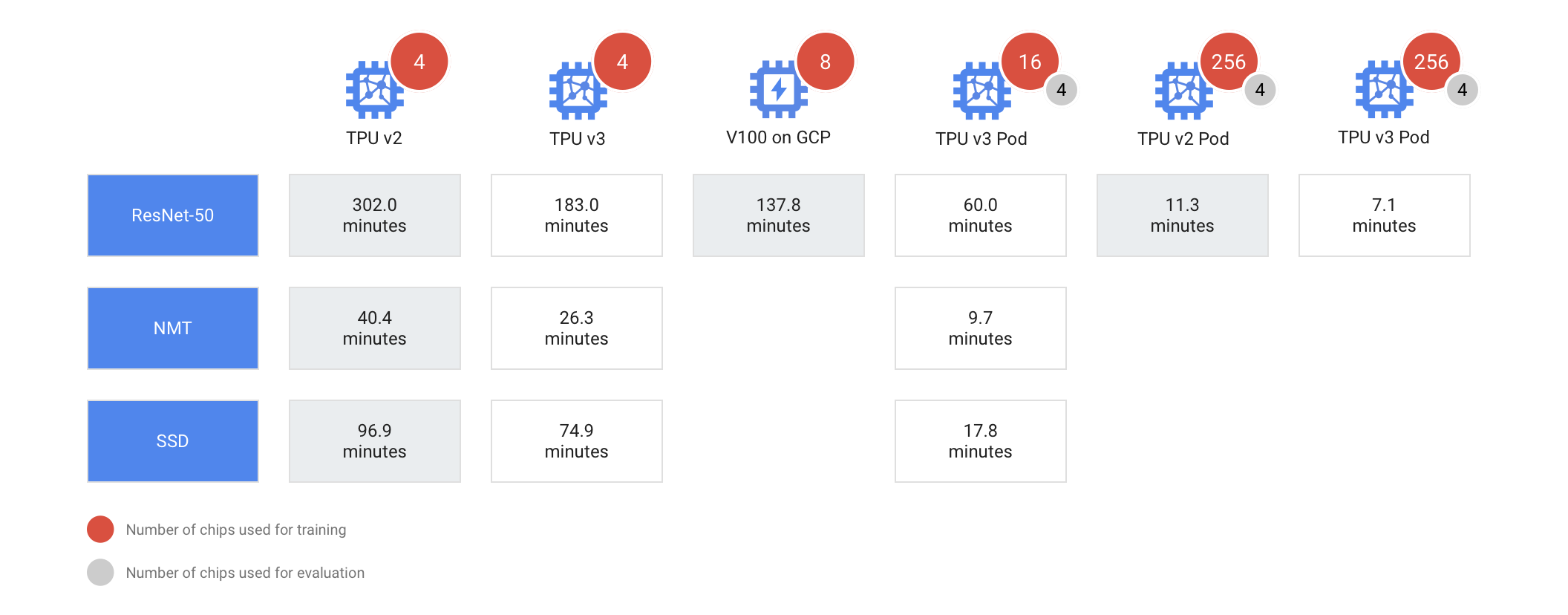
You don’t need to use a full TPU Pod, though. Google also lets developers rent ‘slices’ of these machines. Either way, though, we’re talking about a very powerful machine that can train a standard ResNet-50 image classification model using the ImageNet dataset in two minutes.

The TPU v2 Pods feature up to 512 cores and are a bit slower than the v3 ones, of course. When using 265 TPUs, for example, a v2 Pod will train the ResNet-50 model in 11.3 minutes while a v3 Pod will only take 7.1 minutes. Using a single TPU, that’ll take 302 minutes.

Unsurprisingly, Google argues that Pods are best used when you need to quickly train a model (and theprice isn’t that much of an issue), need higher accuracy using larger datasets with millions of labeled examples, or when you want rapidly prototype new models.

Google latest Android Studio release focuses on speed and stability

At last year’s I/O developer conference, Google announced Project Marble, an effort to bring more speed and stability to the company’s Android Studio IDE. That was in marked contrast to previous updates, where the focus was very much on adding new features. Over time, though, as Google extended Android Studio, it started to slow down. Android Studio 3.5, which the company is launching today, is the result of these efforts.

“We are certainly not done improving quality with Android Studio, but with the work and new infrastructure put into Project Marble we hope that you are even more productive in developing Android apps,” the company notes in today’s announcement.

The most important updates probably focus on speed. One of the things that slowed Android Studio down were memory leaks, for example. Over the last year, the team fixed 33 major memory leaks and a new feature allows the IDE to collect more information about how it uses memory and suggest memory settings for you. It’s now also easier for developers to share their memory problems with Google.

The team also addressed user interface freezes and improved both build and overall IDE speed. The Android Emulator now also uses fewer CPU resources, often by up to 3x.

One interesting update will bring a welcome change to Android Studio users on Windows. Developers on Microsoft’s platform often complained about how their build times were getting slower. The reason for this, it turned out, was that many anti-virus programs would scan Android Studio’s build targets — and these have a lot of small files. Scanning those takes up a lot of I/O and CPU bandwidth. With this update, the IDE now check the directories that could be impacted by this and recommends how to fix this issue.

In addition to these updates that focus on speed and stability, the team also polished numerous existing features, ranging from improved Intellij support to Layout Editor improvement. Android Studio 3.5 is now also officially supported on Chrome OS 72 and high-end x86-based Chromebooks.

Google strengthens Chrome’s privacy controls

Google today announced a major new initiative around its Chrome browser that will, in the long run, introduce significant changes to how Chrome handles cookies and enhance its users’ privacy across the web.

With this move, Google is making cookies more private and also adding new anti-fingerprinting technology to its browser. While some of the changes here are happening in the Chrome browser, developers, too, will have to prepare for this change and adapt their cookies to this new reality.

“We’ve been thinking a lot about this topic for a while and think it’s really important that users have transparent choice and control over how they are tracked over the web,” Google’s web platform lead Ben Galbraith said in an interview ahead of the announcement.

There will be a number of UI changes in Chrome to enable this, but the company isn’t disclosing any information about this yet. Instead, it is talking about the necessary changes in the web platform to enable this.

The overall idea here is to provide users with more control over how their data is shared. While cookies are very useful to allow you to keep a persistent login to a site or store your preferences, for example, they are also being used to track you across the web. Few users, however, would want to block all of their cookies and lose these conveniences. The compromise here is to only allow the site that originally set the cookie to access it and block third-party cookies, making it harder for others to track you using these cookies.

To do this, Chrome will move to require developers to explicitly allow their cookies to be used across websites. Using the SameSite cookie attribute, developers have to explicitly opt in to make their cookies available to others. SameSite simply stops the browser from sending it when it receives a cross-site request. There are some security enhancements that come with this, but the main goal here is to prevent tracking.

Right now, all cookies pretty much look the same to the browser, so it’s hard to selectively delete third-party cookies. Since this change also makes it easier to identify tracking cookies in the browser, though, users can then also more easily delete them.

“This change will enable users to clear all such cookies while leaving single domain cookies unaffected, preserving user logins and settings,” Google explains in today’s announcement. “It will also enable browsers to provide clear information about which sites are setting these cookies, so users can make informed choices about how their data is used.”

SameSite isn’t new, but it’s not all that widely used, especially given that browser don’t have to respect it. In the coming months, however, it will become the default in Chrome.

That’s an important fact to stress: this isn’t just about adding a new feature to Chrome that makes it easier to block or delete tracking cookies — it’s about changing how developers use them at a very fundamental level.

Galbraith also tells me that Google will start experimenting with only allowing cross-site cookies if they are served over an encrypted SSL connection. This is currently hidden behind a flag in the Canary version of Chrome, but it’ll likely become more widely available soon, too.

None of these are immediate changes, though. “I compare this to the deliberate way we moved https to the default in Chrome,” Galbraith said. For this, Google signaled its intent for a few years before finally changing the default.

With its anti-fingerprinting technology, Google is doing something similar to what is happening with cookies. “Because fingerprinting is neither transparent nor under the user’s control, it results in tracking that doesn’t respect user choice,” Google explains. “This is why Chrome plans to more aggressively restrict fingerprinting across the web. One way in which we’ll be doing this is reducing the ways in which browsers can be passively fingerprinted, so that we can detect and intervene against active fingerprinting efforts as they happen.”

For a company that makes most of its revenue from advertising, that’s a pretty bold move. It’s also a bit late, given that users have been asking for these privacy controls for a while. Galbraith acknowledged that “this is increasingly an area of concern for users.”

In a related announcement, the Google Ads team today said that it is “committing to a new level of ads transparency.” The first step in actually providing users with better insights into how ads are personalized for them, Google will launch a browser extension that will disclose the names of the companies that were involved into getting these ads in front of you (including ad tech companies, advertisers, ad trackers and publishers) and the factors that were used to tailor the ad to the user.

This extension is going live today and will work for all of Google’s own properties and those of its publishing partners. The company is also making an API available to other advertising companies that want to feed the same information into the browser extension.

Even though in the age of mobile apps, tracking users through browser cookies isn’t quite as important as it used to be, it’s still an important mechanism for many online advertising firms, including Google. Google’s move has wide-ranging implications for online advertising and it’ll be interesting to see how Google’s competitors in this space will react to the announcement.

Here’s everything Google announced today at the I/O 2019 Keynote


In a two hour keynote at the annual Google I/O Conference this afternoon, the company announced a ton of stuff it’s been working on over the last year, from new phones to a next-gen version of its voice-powered Assistant.

Don’t have time to watch it all? That’s okay — we’ll summed up the biggest stuff for you.

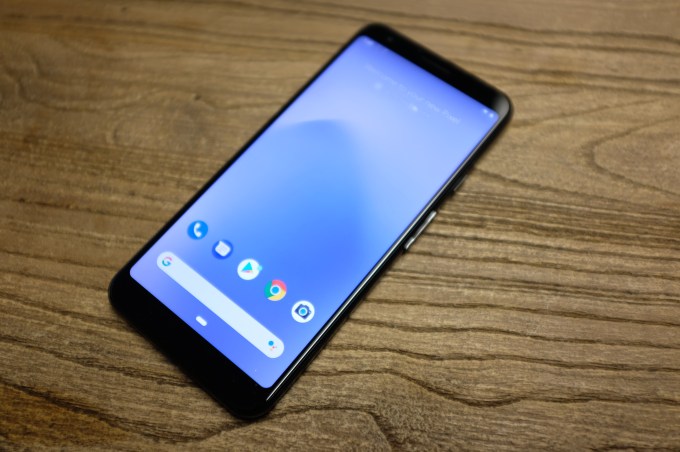
Google Pixel 3a and 3a XL

As rumored, Google is launching more affordable versions of its Pixel 3 phones.

To bring the price down, they’ve bumped the processor down a bit (from a Snapdragon 845 to a Snapdragon 670), capped storage at 64GB, and dropped wireless charging capabilities. On the upside, they found room for a 3.5mm headphone jack!

The Pixel 3a will start at $399, and come with a 5.6″ display, 12.2mp rear camera, and run Android P out of the box. The Pixel 3a XL will start at $479, and bumps the screen up to 6.0″.

TechCrunch’s Brian Heater checked out the devices earlier this week. You can find his impressions here.

Nest Hub and Nest Hub Max

The Google Home Hub is being rebranded as the “Nest Hub,” with the price dropping from $149 to $129.

Meanwhile, it’s getting a bigger brother: take the Nest Hub, bump the display up from 7″ to 10″, and add a camera — that’s the Nest Hub Max. The Nest Hub Max will tie into the Nest app, allowing it to function like any other Nest cam. Google says a hardware switch on the back disables the camera/microphone (alas, it doesn’t seem like you can disable one without disabling the other.) It’ll cost $229 and ship this summer.

A new “Face Match” feature on the Nest Hub Max will recognize your face to customize its responses. In a blog post on the feature, Google says “Face Match’s facial recognition is processed locally with on-device machine learning, so the camera data never leaves the device.”

Augmented Reality in search

Certain search results — like, say, a search for a specific shoe model, or “great white shark” — will now include 3D models. Tap the model and you’ll be able to place it in a view of the real world via augmented reality.

Google Lens Upgrades

Google Lens is learning a few new tricks. Point Google Lens at a restaurant’s menu, and it’ll highlight the most popular items. Point it at your receipt, and it’ll automatically calculate things like tips and totals.

Duplex on the Web

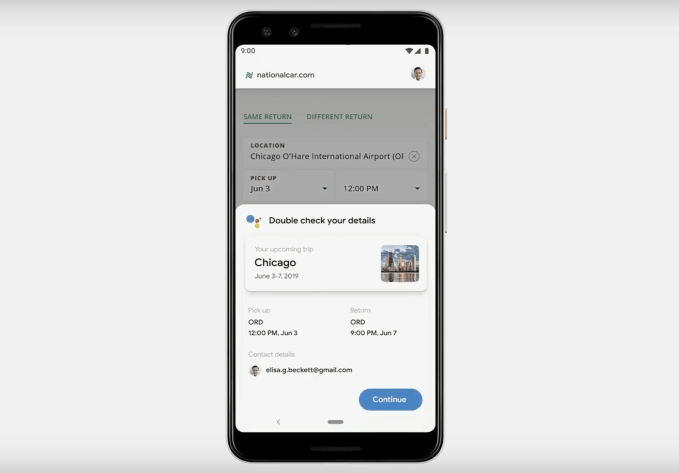
At I/O last year, Google launched Duplex, an AI-powered customer service tool meant to help small businesses (like restaurants and hair salons) field more phone calls, answering common questions and scheduling reservations or appointments.

This year it’ll expand on this by opening up Duplex to the web. Online car rental reservations were given as an example; you say “get me a rental car through [rental company]”, and it pulls up that company’s website and automatically starts booking your car. It can pre-fill things like trip dates from your calendar, and car preferences based on previous rental confirmations found in your Gmail.

Google’s “Next-Gen” Assistant

Google has managed to shrink its voice recognition models down from hundreds of gigabytes to half a gigabyte, making them small enough to fit right on a phone.

By storing it locally. they’re able to eliminate the latency involved with the back-and-forth pings to the cloud, making conversations with Assistant almost instantaneous. As it’s running on the device, it’ll work even in airplane mode. The company showed off the new speed by firing off voice requests rapid fire, with very little delay between commands (like “Call me a Lyft” or “Turn on my flashlight”) and their resulting actions.

Google says its next-gen Assistant will hit new Pixel phones later this year.

Google Assistant in Waze

Google Assistant will be built into the Waze up “in just a few weeks”, allowing you to do things like report accidents or potholes by voice.

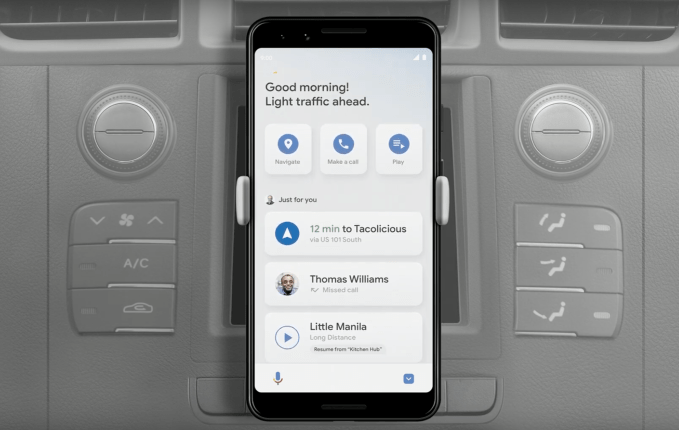
Google Assistant Driving Mode

Saying “Hey Google, lets drive” will now shift Assistant into driving mode, a minimalist/at-a-glance dashboard view that focuses on what you might need while behind the wheel, like directions to your daily spots and music control.

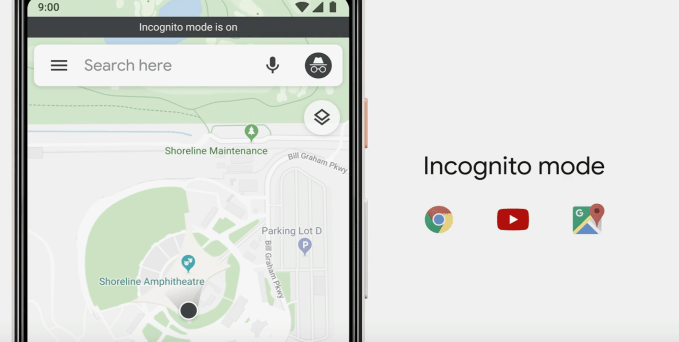
Incognito Mode in Google Maps

Like incognito mode in a browser, the new incognito mode in Google Maps will prevent your destination searches/routes from being saved to your Google account history.

Live Caption and Live Transcribe

Android will soon be able to automatically generate captions for media on your phone, including podcasts you’ve got saved and videos you’ve recorded. 

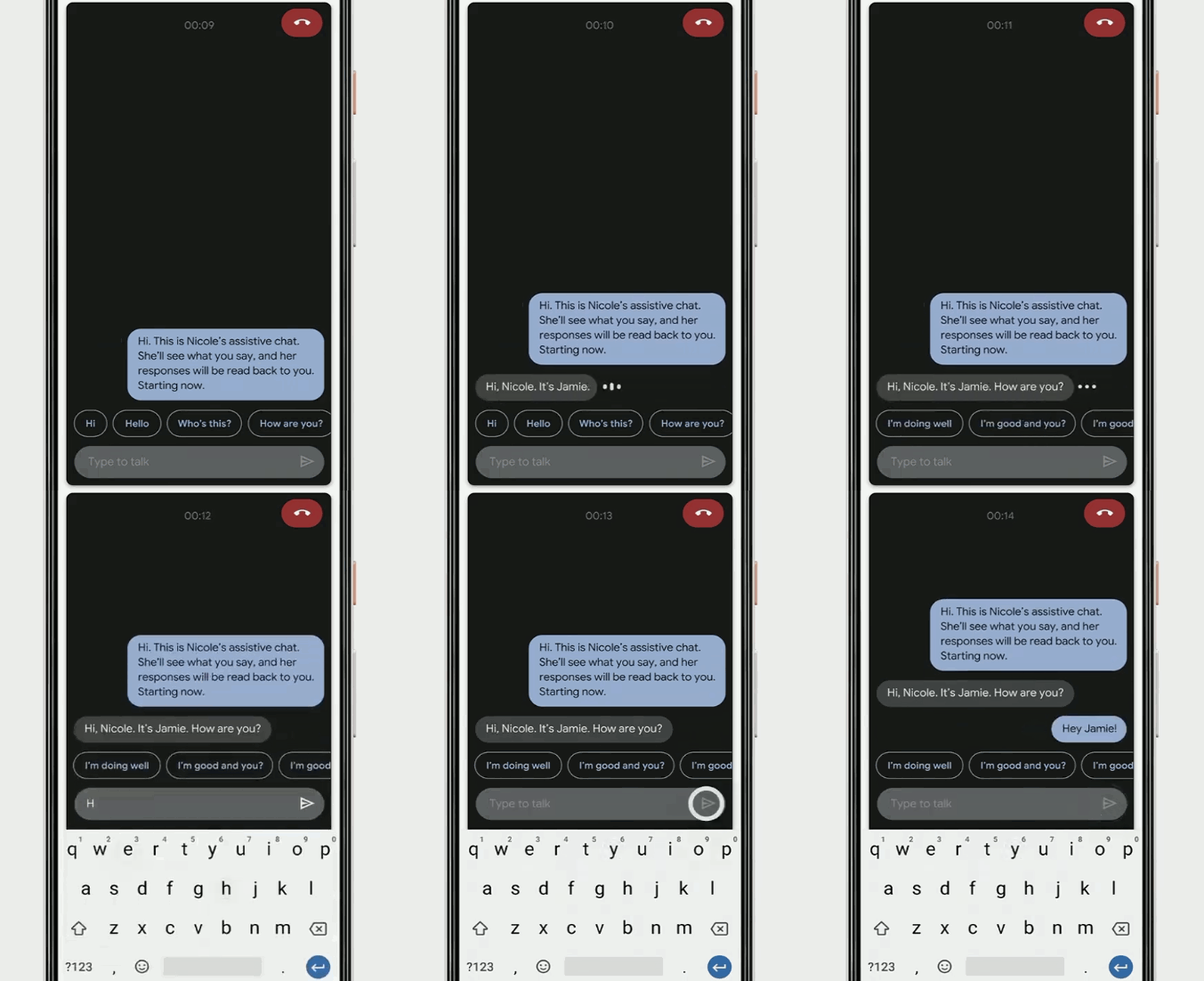
Through a feature the company calls “Live Relay”, it can also transcribe phone calls in realtime, and allows users to respond via text.

Here’s Google’s video of Live Relay in action:

https://platform.twitter.com/widgets.js


Project Euphonia

Google is researching how it can adapt its AI voice algorithms to better understand users with speech impairments (such as those with ALS or who have had a stroke), custom tailoring its models to an individual user’s speech to better help them communicate.

https://platform.twitter.com/widgets.js

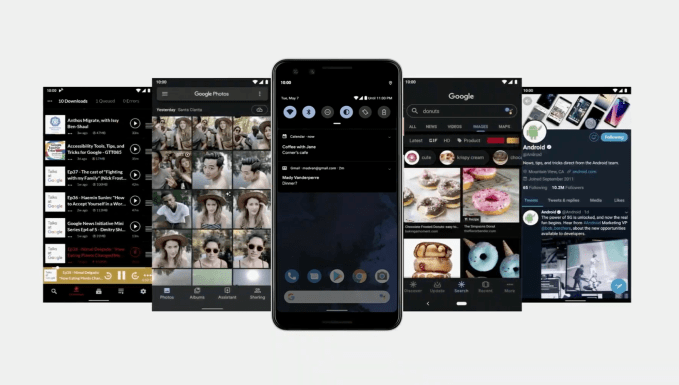
Dark Theme

Android Q will have a dark mode; you can trigger it manually, or it’ll turn on automatically in battery saver mode.

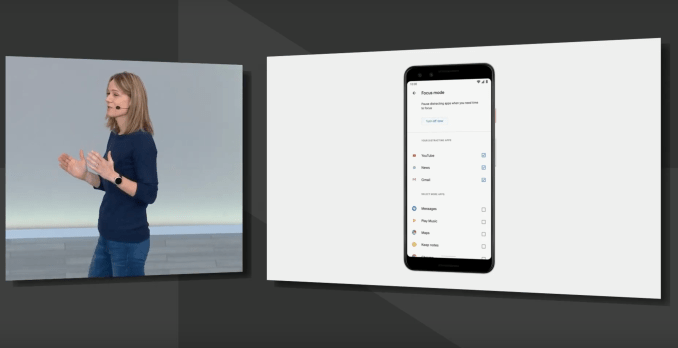
Focus Mode

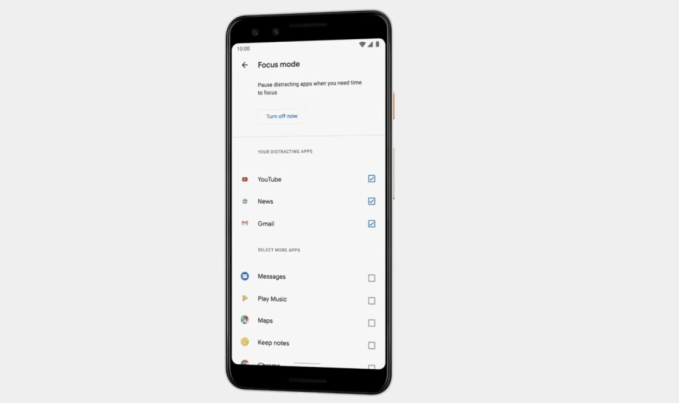
Need to get some work done? With Focus Mode, you’ll make a list of the apps you find most distracting — flip a switch, and they’ll disappear until you turn Focus Mode off.  It’ll hit Android this fall.

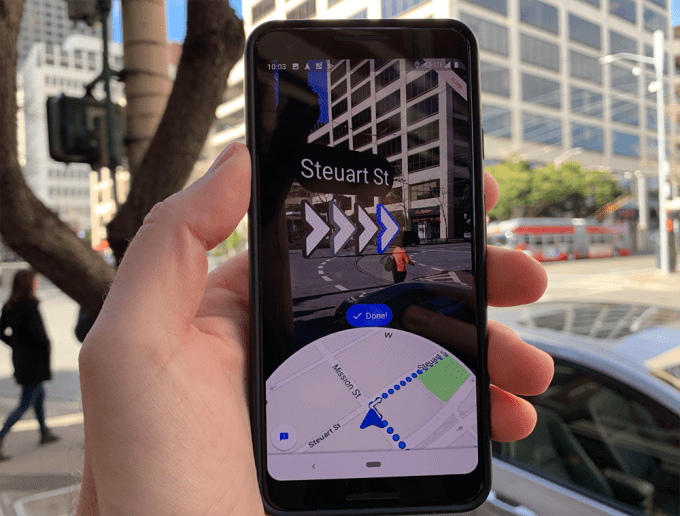
Google Maps AR mode rolls out to Pixel phones

A few months back, Google showed off a new augmented reality mode that it’s been working on for Google Maps. The goal? Help make sure people start off their walks heading in the right direction. Hold your phone up and you’ll see a camera view of the world in front of you. Google Maps will compare this image to its Street View data to determine your exact position/orientation better than GPS alone can, then draw arrows that point you in the right direction.

This mode has been in beta for a while, and should start hitting Pixel phones later today.

Keyword research in 2019: Modern tactics for growing targeted search traffic

In 2019, it’s estimated that every minute there are 150 new websites coming online. While many of these won’t be long-term ventures, a large percentage will eventually find themselves looking to organic search engine traffic to grow their reach.

This invariably leads people to the task of keyword research; uncovering the search terms most likely to result in prospective customers.

With increased competition it’s imperative you don’t just focus on the traditional sources of keyword inspiration that every other business uses.

In the past year alone I’ve personally helped hundreds of business owners grow search engine traffic to their websites. This responsibility drives me to succeed in one key area: Finding relevant search terms to target that their competitors have likely missed.

In this article, I will highlight some of the most overlooked ideas and sources of data to reveal words and phrases relevant to your business that are high in intent but lacking in competition.

If you can find the keywords your audience are searching for, but your competitors haven’t found, you can leverage a huge advantage to increase traffic and engagement on your content.

Table of Contents

  1. Be Open to Talking About Your ‘Best’ Competition
  2. Use [Brand Alternatives] Search Terms to Gain Visibility
  3. Find Content Opportunities in the ‘People Also Ask’ Box
  4. Use Public Wikipedia Stats to See If a Term Is Worth Targeting
  5. Quora’s Ad Platform Reveals Popular Search Terms Without Spending a Penny
  6. Wikihow’s Public View Counts Are Great for Tutorial-Based Content Inspiration
  7. Bonus Tip: ProductHunt Dominate ‘Alternatives’ Keywords: Make Sure You Have a Listing There
  8. To Recap

1. Be Open to Talking About Your ‘Best’ Competition

Google is constantly improving their ability to understand searcher intent. That is, they know what people are looking for and the results that will satisfy those searches.

When it comes to any industry that offers products or services, one of the most common search queries is often some variation of “best [industry] [services / products]”.

Live transcription and captioning in Android are a boon to the hearing-impaired

A set of new features for Android could alleviate some of the difficulties of living with hearing impairment and other conditions. Live transcription, captioning, and relay use speech recognition and synthesis to make content on your phone more accessible — in real time.

Announced today at Google’s I/O event in a surprisingly long segment on accessibility, the features all rely on improved speech-to-text and text-to-speech algorithms, some of which now run on-device rather than sending audio to a datacenter to be decoded.

The first feature to be highlighted, live transcription, was already mentioned by Google before. It’s a simple but very useful tool: open the app and the device will listen to its surroundings and simply display any speech it recognizes as text on the screen.

We’ve seen this in translator apps and devices, like the One Mini, and the meeting transcription highlighted yesterday at Microsoft Build. One would think that such a straightforward tool is long overdue, but in fact everyday circumstances like talking to a couple friends at a cafe, can be remarkably difficult for natural language systems trained on perfectly recorded single-speaker audio. Improving the system to the point where it can track multiple speakers and display accurate transcripts quickly has no doubt been a challenge.

Another feature enabled by this improved speech recognition ability is live captioning, which essentially does the same thing as above, but for video. Now when you watch a YouTube video, listen to a voice message, or even take a video call, you’ll be able to see what the person in it is saying, in real time.

That should prove incredibly useful not just for the millions of people who can’t hear what’s being said, but also those who don’t speak the language well and could use text support, or anyone watching a show on mute when they’re supposed to be going to sleep, or any number of other circumstances where hearing and understanding speech just isn’t the best option.

Gif showing a phone conversation being captioned live.Captioning phone calls is something CEO Sundar Pichai said is still under development, but the “live relay” feature they demoed on stage showed how it might work. A person who is hearing-impaired or can’t speak will certainly find an ordinary phone call to be pretty worthless. But live relay turns the call immediately into text, and immediately turns text responses into speech the person on the line can hear.

Live captioning should be available on Android Q when it releases, with some device restrictions. Live transcribe is available now but a warning states that it is currently in development. Live relay is yet to come, but showing it on stage in such a complete form suggests it won’t be long before it appears.

Google expands digital wellbeing tools to include a new ‘Focus mode,’ adds improved parental controls to Android

Last year at Google I/O, Google introduced a host of new digital wellbeing tools aimed at helping people better manage their screen time, track app usage, and configure their device’s ‘do not disturb’ settings. Today, Google is updating its suite of tools to include a new feature called “Focus Mode” that lets you temporarily disable distracting apps while not missing critical information, as well as a few new features for users of its parental control software, Family Link, which is now a part of the Android OS.

With Focus Mode, a new feature for Android devices, you can turn off the apps you personally find distracting while you’re trying to sit down and get things done. For example, you could disable updates from distracting social media apps or email, but could choose to leave texting on so family members could reach you in an emergency.

Though not mentioned during the announcement, the feature could also help people enjoy their devices in their downtime — like streaming from Netflix without getting bothered by Slack notifications and work email. That’s not necessarily a way to reduce screen time — which is what a lot of today’s digital wellbeing features provide. Instead it’s about finding balance between when it’s time to work and when it’s not, and what things deserve our attention at a given time.

Also unveiled today at Google I/O were new features for Family Link, Google’s software that lets parents control what kids can do on their devices, and track their usage.

Now, parents can set time limits on specific apps instead of just “screen time” in general. This is similar in a way to what Amazon’s FreeTime parental controls today offer, as they allow parents to require that kids finish their reading before they can play games, for example. In Google’s case, it’s instead allowing parents to limit certain apps they believe are distractions to children.

Another new feature will allow parents to give kids extra screen time, or “bonus time.”

This could help kids who need just a few more minutes to wrap up what they’re doing on their device, or could be doled out as a reward, depending on how parents wanted to use the feature.

The company also announced it’s making Family Link part of every Android device, beginning with Android Q. That means Family Link will become accessible from device settings, instead of being an optional app parents can choose to download.  You’ll find it under the “digital wellbeing and parental controls” in Android Q devices rolling out later this summer, says Google.

“We’re spending a lot of time on phones, and people tell us, sometimes they wish they spent more time on other things. We want to help people find balance and digital wellbeing. And yes, sometimes this means making it easier to put your device away entirely, and focus on the times that really matter,” said Stephanie Cuthbertson, Senior Director for Android. 

She said these tools were already proving useful, as 90% of app timers helped users stick to their goals and there was a 27% drop in nightly usage thanks to Wind Down. However, the company didn’t share how many users were taking advantage of the digital wellbeing features as a whole.


Google Maps AR directions rolls out today on Pixel phones

One of the more bizarre, yet intriguing, demos from last year’s Google I/O is now available for real users. AR walking directions in Google Maps is finally rolling out to Pixel users today.

Augmented reality directions will let users better orient themselves when they pop open Google Maps and will give users more visual cues to ensure they’re not getting lost. The directions will surface in a camera view and will place arrows in physical space.

We got a hands-on with the AR Maps feature earlier this year and were generally impressed.

No mention of when this feature might be coming to non-Pixel phones, with the company noting that this is an “early preview.”