Microsoft aims to modernize and secure voting with ElectionGuard

When it comes to voting, we’ve come a long way from dropping pebbles into an amphora, but still not nearly far enough, if the lack of confidence in our election systems is any indication. Microsoft is the first major tech company to take on this problem with a new platform it calls ElectionGuard that promises to make elections more secure and transparent — and yes, it’s free and open source.

Set to be made available this summer and piloted during the 2020 elections, ElectionGuard is not a complete voting machine, but rather a platform for handling voting data that can either empower existing systems or have new ones built on top of it. It’s part of the Defending Democracy Program and sister product to the similarly-named NewsGuard and AccountGuard, which appeared last year.

The basic idea is to let voters track their votes securely and privately, while also allowing authorities to tabulate, store, and if necessary audit them. As Microsoft puts it:

ElectionGuard provides a complete implementation of end-to-end verifiable elections. It is designed to
work with systems that use paper ballots, supplementing today’s tabulation process by providing a
means of public verification of the accuracy of reported results.

The platform would sit underneath existing voting systems, and when a voter casts their ballot, the data would be entered in the ordinary fashion in a state’s election systems but also in ElectionGuard. The voter would then be given a tracking code that lets them see that their vote has been, say, recorded locally at the correct polling place, or perhaps that it has been sent on to state authorities for auditing.

Meanwhile the ElectionGuard databases are securely recording all votes and tabulating them, a process that would happen in parallel with existing tabulation processes. In the case of an audit, random ballots could be selected from the database and compared with paper ballots, providing a quick way to see if, for example, a machine error in one district was throwing off results.

Importantly, this is all accomplished without Microsoft, or whoever is actually administrating the ElectionGuard system, knowing how any individual voted. This is done, the company explained, via a cryptographic technique known as homomorphic encryption. Basically it allows a system to perform mathematical operations on encrypted data without decrypting it, making interference or exfiltration of that sensitive data next to impossible.

In this case every vote is trackable only by the individual who made it, but the system is limited to adding up encrypted votes and reporting those sums.

Ultimately ElectionGuard aims to be a full voting solution, but one that can be customized and run on any number of actual devices — just like the rest of Microsoft’s software.

When it’s time to vote, ElectionGuard supports the use of standard tablets and PCs running a variety of operating systems as a ballot marking device, which can be used to create an interface that looks and feels like modern applications people interact with every day on their phones and tablets.

Here’s hoping ease of deployment and a modern code base will end for good the reign of aged and insecure voting machines that can be hacked with a USB key. Microsoft is also working with election tech suppliers to bring ElectionGuard into existing product lines or build new ones.

The company worked together with Galois to develop ElectionGuard, a company that has been working on election security for years and recently received a $10 million grant from DARPA to pursue secure voting hardware.

It will no doubt take some tinkering, but it’s good to see a major tech company making a credible and comprehensive bid to fix an elections process that is technologically compromised on multiple fronts. Tech can’t fix politics, but it can sure build a better way to vote.


Microsoft launches a new platform for building autonomous robots

One major — and somewhat unexpected — theme at Microsoft’s Build developer conference this week is autonomous robots. After acquiring AI startup Bonsai, which specialized in reinforcement learning for autonomous systems, the company today announced the limited preview of a new Azure-based platform that is partially built on this acquisition and that will help developers train the models necessary to power these autonomous physical systems.

“Machines have been progressing on a path from being completely manual to having a fixed automated function to becoming intelligent where they can actually deal with real-world situations themselves,” said Gurdeep Pall, Microsoft vice president for Business AI. “We want to help accelerate that journey, without requiring our customers to have an army of AI experts.”

This new platform combines Microsoft’s tools for machine teaching and machine learning with simulation tools like Microsoft’s own AirSim or third-party simulators for training the models in a realistic but safe environment, and a number of the company’s IoT services and its open-source Robot Operating System.

In preparing for today’s launch, Microsoft worked with customers like Toyota Material Handling to develop an intelligent and autonomous forklift, for example, as well as Sarcos, which builds a robot for remote visual inspections that are either unreachable or too dangerous for humans. Typically, Sarcos’ robot is remotely controlled by an operator. After working with Microsoft, the company built a system that allows the robot to autonomous traverse obstacles, climb stairs and climb up metallic walls. What’s important here, though, is that there is still a human operator in the loop, but since the robot can sense its surroundings and move autonomous, operators can focus on what they are seeing instead of having to deal with the mechanics of steering the robot.

“We are looking to offload the tasks that can be automated — how does the robot climb a stair? How does it move around obstacle? — so the operator can focus on the more important parts of the job,” Kristi Martindale, the executive vice president and chief marketing officer for Sarcos. “The human is still there to say, ‘No you actually want to go to that obstacle over there because maybe that obstacle is a person who is hurt.’”

Bonsai CEO Mark Hammond echoed this: “In any sort of operation where you have a mechanical system that interacts with the physical world, you can probably make it smarter and more autonomous. But keeping people in the loop is still very desirable, and the goal is really to increase the capabilities of what those humans can do.”

While robots are a flashy use case, though, Microsoft is also looking at more pedestrian use cases like cooling and heating systems that autonomously react to temperature changes.

Word’s new AI editor will improve your writing

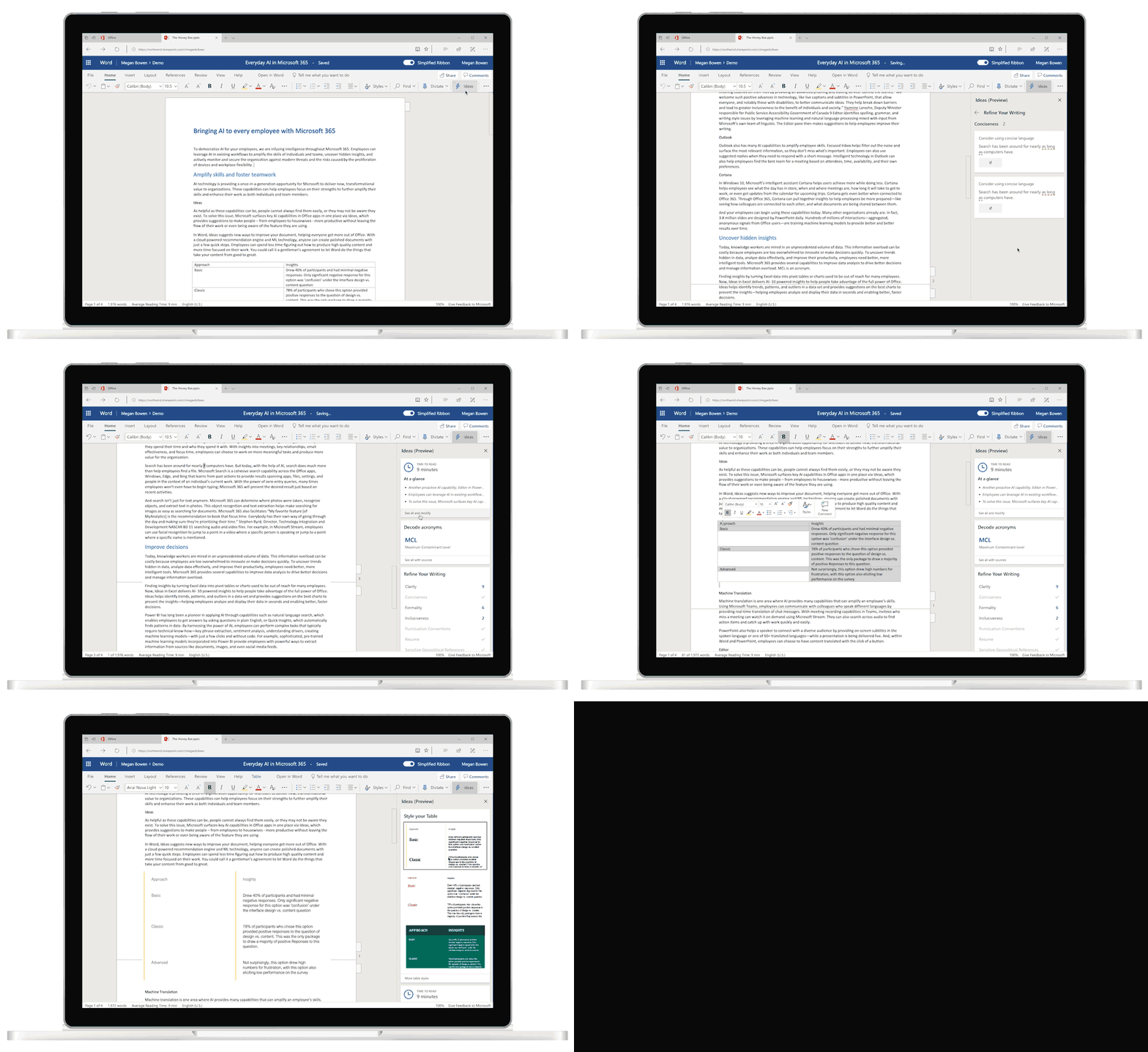
If you write in Microsoft Word Online, you’ll soon have an AI-powered editor at your side. As the company announced today, Word will soon get a new feature called “Ideas” that will offer writers all kinds of help with their documents.

If writing is a struggle for you, the most important feature of Ideas is surely its ability to help you write more concise and readable text. You can think of this as a grammar checker on steroids, as it goes beyond fixing obvious mistakes and focuses on making your writing better. It uses machine learning, for example, to suggest a rewrite when you mangled a complex phrase. Ideas will also help you write more inclusive texts.

The cloud-based tool will also give you information about the estimated reading times and decode acronyms for you, based on data it has about your company in the Microsoft Graph.

Ideas can also automatically extract key points from a document. That’s probably more interesting to a reader than a writer, though, so I expect that’s something users will use when somebody sends them a 67-page news summary.

Microsoft also notes that Ideas will bring something called the “Word Designer” to the word processor, which will help you style different parts of a document, including tables.

These new features will come to Office Insiders in June and will become generally available to all users in the fall.

Microsoft launches Visual Studio Online, an online code editor

Microsoft today announced the private preview launch of Visual Studio Online, an online code editor the company is positioning as a companion to Visual Studio and Visual Studio Code.

The service is based on the Visual Studio Code, Microsoft’s popular free and open-source desktop code editor. This means Visual Studio Online will also support all the extensions that are currently available for Visual Studio Code, as well as popular features like Visual Studio Code workspaces. Support for IntelliCode, Microsoft’s tool for AI-assisted development that became generally available today, is also built-in.

The emphasis here is on Visual Studio Online being a ‘companion.’ It’s not meant to become a developer’s default environment but instead as a way to make a quick edit, review a pull request or join a Live Share session.

And if you think the name Visual Studio Online sounds familiar, that’s because Microsoft is actually recycling this name. Not that long ago, Visual Studio Code was Microsoft’s hub for all things DevOps, before DevOps was a buzzword. Last year, the company renamed it to Azure DevOps, leaving the name open for other uses. Frankly, given the name, a lot of people probably always assumed that Visual Studio Online was a web-based version of the integrated development environment, only to be then disappointed that it wasn’t.

It’s worth noting that if you don’t want to wait for Microsoft to open the private preview to more users, there are also startups like Coder, which can provide you with a remote Visual Studio Code environment.

Microsoft open-sources its quantum computing development tools

Microsoft’s quantum computer may not have a working qubit yet, but the company has been hard at work on building the tools to program future quantum computers. Over the course of the last few years, the company announced both Q#, a programming language for writing quantum code and a compiler for this language, as well as a quantum simulator. Today, Microsoft announced that it will open source these efforts in the coming months.

This move, the company says, is meant to make “quantum computing and algorithm development easier and more transparent for developers.” In addition, it will also make it easier for academic institutions to use these tools and developers, of course, will be able to contribute their own code and ideas.

Unsurprisingly, the code will live on Microsoft’s GitHub page. Previously, the team had already open-sourced a number of tools and examples, as well as a library of quantum chemistry samples, but this is the first time the team is open-sourcing core parts of the platform.

“Our approach to solving intractable industry problems requires new types of scalable software tools, and the Quantum Development Kit offers that and supports us in every step our development process,” said Andrew Fursman, co-founder and CEO of 1QBit, in today’s announcement. “We’re excited to contribute two important code samples to accelerate advanced materials and quantum chemistry research, including one focusing on Variational-Quantum-Eigensolver (VQE) and another which demonstrates density matrix embedding theory (DMET) running on our platform, QEMIST.”

It’s not the first company to do so, though. IBM, for example, offers Qiskit, an open-source framework for building quantum computing programs, including the Aer simulator.  Rigetti Computing, too, has open sourced many of its tool.

Only about a month ago, Microsoft also announced that the Development Kit has been downloaded over 100,000 times. At the time, it also brought support for Q# programming to Jupyter notebooks.

While all these software efforts are laudable, though, Microsoft’s quantum hardware efforts have yet to pay off. The company is taking a novel approach to quantum computing, which may yet give it a lead over its competitors in the long run. In the short term, though, some of its competitors are already making real, physical — but limited — quantum computers available to developers.

Microsoft’s IntelliCode for AI-assisted coding comes out of preview

IntelliCode, Microsoft’s tool for AI-assisted coding, is now generally available. It supports C# and XAML in Visual Studio and Java, JavaScript, TypeScript and Python in Visual Studio Code. By default, it is now also included in Visual Studio 2019, starting with the second preview of version 16.1, which the company also announced that.

IntelliCode is essentially the next generation of IntelliSense, Microsoft’s extremely popular code completion tool. What makes IntelliCode different is that the company trained it by feeding it the code of thousands of open-source projects from GitHub that have at least 100 stars. Using this data, the tool can then make smarter code-completion suggestion. It also takes the current code and context into account as it makes its recommendations.

By default, IntelliSense would provide the developer with an alphabetical list, which is useful but too often, the code you need would be a few items down in the list.

It’s worth noting that startups like Kite offer similar smart code-completion tools that work across development environments, though Kite currently only supports Python code.

The promise of tools like Kite and IntelliCode is to make a developer’s life easier, increase productivity and reduce the likelihood of bugs. As these tools get smarter, they’ll likely be able to look ahead even further and maybe even suggest to auto-complete larger part of a program’s code based on the context of what you’re trying to achieve and it’s knowledge of how others have solved similar problems. Until then, though, they are already a pretty good way to avoid a few trips to StackOverflow.

Microsoft launches React Native for Windows

Microsoft today announced a new open-source project for React Native developers who want to target Windows. “React Native for Windows,” as the project is unsurprisingly called, is meant to be a new ‘performance-oriented’ implementation of React for Windows under the MIT License.

Being able to target Windows using React Native, a framework for cross-platform development that came out of Facebook, isn’t new. The framework, which allows developers to write their code in JavaScript and then run it on Android and iOS, already features plugins and extensions for targeting Windows and macOS.

With React Native for Windows, Microsoft is reimplementing React Native and rewriting many components in C++ to get maximum performance. It allows developers to target any Windows 10 device, including PCs, tablets, Xbox, mixed reality devices and more. With Microsoft backing the project, these developers will now be able to provide their users with faster, more fluid apps.

Microsoft the project is now available on GitHub and ready for developers to test, with more mature versions following in the near future.

Windows gets a new terminal

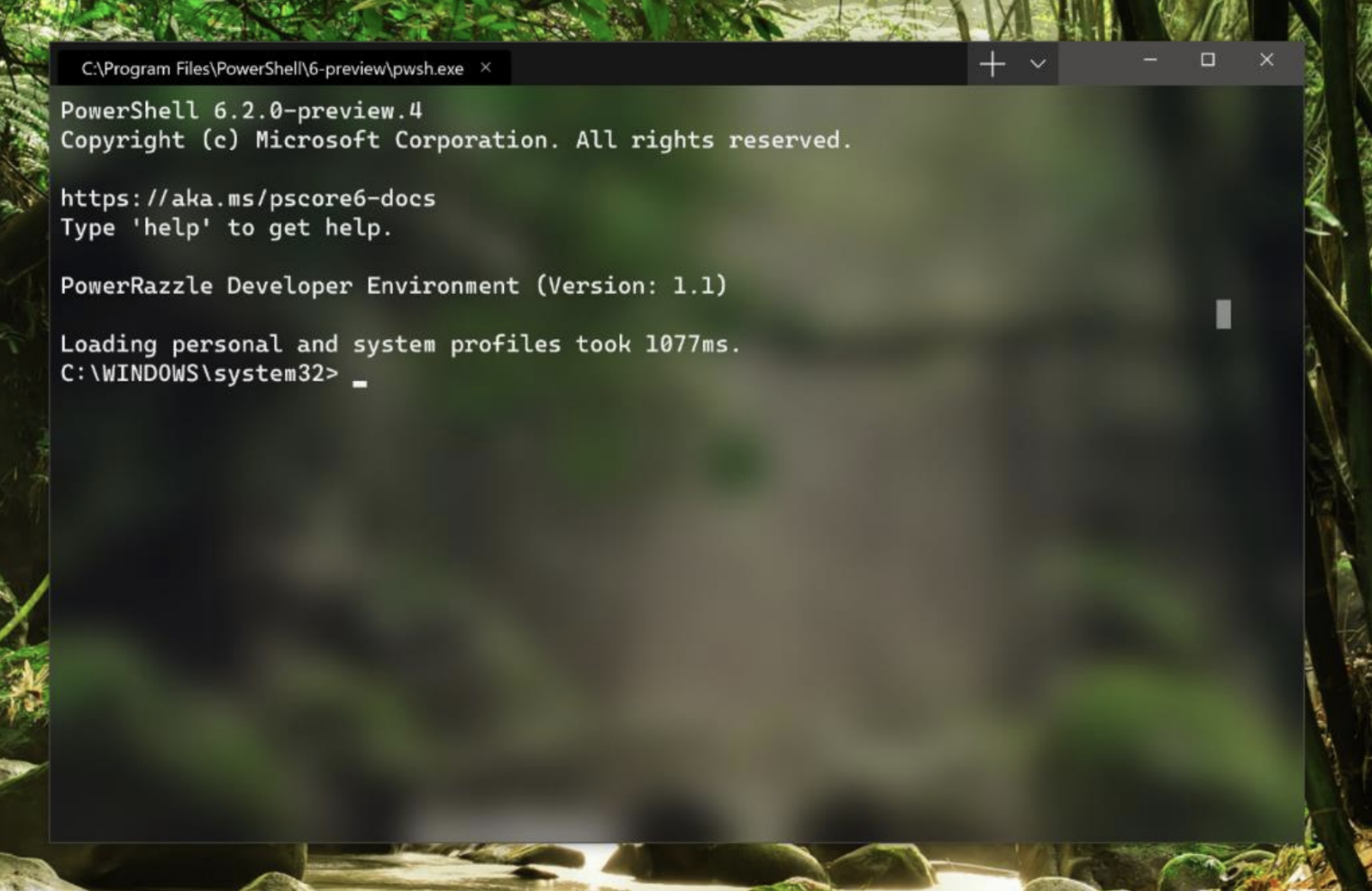
Windows 10 is getting a new terminal for command-line users, Microsoft announced at its Build developer conference today.

The new so-called ‘Windows Terminal’ will launch in mid-June and promises to be a major update of the existing Windows Command Prompt and PowerShell experience. Indeed, it seems like the Terminal will essentially become the default environment for PowerShell, Command Prompt and Windows Subsystem for Linux users going forward.

The new terminal will feature faster, GPU-accelerated text rending and “emoji-rich” fonts, because everything these days needs to support emojis and those will sure help lighten up the command-line user experience. More importantly, though, the Windows Terminal will also support shortcuts, tabs, tear-away windows, and theming, as well as extensions. It will also natively support Unicode and East Asian fonts.

The idea here, Microsoft says, is to “elevate the command-line user experience on Windows.”

The first preview of the new Windows Terminal is now available.

Microsoft and Red Hat launch a new event-driven Kubernetes autoscaling tool

It’s not a developer conference until somebody talks about Kubernetes, so it’s no surprise that Microsoft is highlighting a number of new features around the container orchestration service at its Build conference today.

Most of these are relatively minor and involve features like better support for Azure Policy, new tools for building and debugging containers, and updates to the Azure Container registry which now allows users to automate their continuous integration and deployment workflows using Helm charts.

What’s most interesting here, however, is KEDA, a new open-source collaboration between Red Hat and Microsoft that helps developers deploy serverless, event-driven containers. Kubernetes-based event-driven autoscaling, or KEDA, as the tool is called allows users to build their own event-driven applications on top of Kubernetes. KEDA handles the triggers to respond to events that happen in other services and scales workloads as needed.

KEDA works in any public or private cloud and on-premises, including, unsurprisingly, Azure Kubernetes Service and Red Hat’s OpenShift. With this, developers can also now take Azure Functions, Microsoft’s serverless platform, and deploy it as a container in Kubernetes clusters, including on OpenShift.

Microsoft and GitHub grow closer

Microsoft’s $7.5 billion acquisition of GitHub closed last October. Today, at its annual Build developer conference, Microsoft announced a number of new integrations between its existing services and GitHub. None of these are earth-shattering or change the nature of any of GitHub’s fundamental features, but they do show how Microsoft is starting to bring GitHub closer into the fold.

It’s worth noting that Microsoft isn’t announcing any major GitHub features at Build, though it’s only a few weeks ago that the company made a major change by giving GitHub Free users access to unlimited private repositories. For major feature releases, GitHub has its own conference anyway.

So what are the new integrations? Most of them center around identity management. That means GitHub Enterprise users can now use Azure Active Directory to access GitHub. Developers will also be able to use their existing GitHub accounts to log into Azure features like the Azure Portal and Azure DevOps. “This update enables GitHub developers to go from repository to deployment with just their GitHub account,” Microsoft argues in its release announcement.

As far as selling GitHub goes, Microsoft also today announced a new Visual Studio subscription with access to GitHub Enterprise for Microsoft’s Enterprise Agreement customers. Given that there is surely a lot of overlap between Visual Studio’s enterprise customers and GitHub Enterprise users, this move makes sense. Chances are, it’ll also make moving to GitHub Enterprise more enticing for current Visual Studio subscribers.

Lastly, the Azure Boards app, which offers features like Kanban boards and sprint planning tools, is now also available in the GitHub Marketplace.